
Automation
Customize Accuracy & Timing
MemGenie lets you customize your accuracy rate and answer timing during Membean training — keeping your results looking natural and undetectable.
2 min read
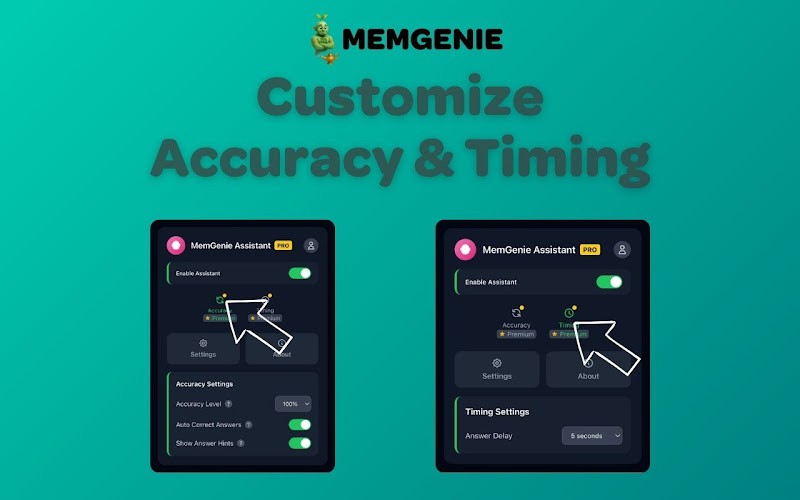
MemGenie is a Chrome extension for Membean that lets you control two key settings — how often it gets answers right, and how long it waits before answering. These settings exist so your Membean activity looks like a real student rather than a bot.
What Are the Accuracy and Timing Settings?
When MemGenie automates your Membean session, it's making decisions on your behalf — which answer to select, when to select it, how fast to type. Left uncustomized, automation can look robotic. MemGenie's accuracy and timing settings fix that by putting you in control of how natural your activity looks.
There are two settings:
Accuracy — controls how often MemGenie gets the answer right Timing — controls how long MemGenie waits before answering
Together these two settings determine what your Membean data looks like to anyone reviewing it.
Why Accuracy Settings Matter
A student who gets 100% of Membean questions correct every single session is unusual. Real students get things wrong, especially on words they haven't seen many times. A perfect score every session is one of the most obvious patterns that can draw attention.
MemGenie's accuracy setting lets you set a realistic correct answer rate. Instead of always picking the right answer, MemGenie will intentionally miss a percentage of questions based on whatever rate you configure — making your results look exactly like a normal student working through their training.
You're in full control of where that number sits. Set it high if you want to look like a strong student. Set it slightly lower if you want something that looks more average.
Why Timing Settings Matter
How long a student takes to answer a question is one of the most telling behavioral signals in any online learning platform. Answer too fast every time and it looks like something other than a human is operating the account.
MemGenie's timing settings let you set the delay between a question loading and an answer being selected. Rather than answering in a fixed, robotic interval, you can configure a range that mimics natural human response times — sometimes a little faster, sometimes a little slower, just like a real person thinking through an answer.
This is what separates MemGenie from basic auto-clickers that answer at an identical speed every single time.
Who Are These Settings For?
Accuracy and timing customization is a Pro plan feature — available at $1.99/month. Here's the full plan breakdown:
Free Plan — $0/month
Highlights correct answer in green ✓
15 minute weekly cap
No accuracy or timing customization
Pro Plan — $1.99/month
Full automation ✓
Customize accuracy settings ✓
Customize timing settings ✓
Unlimited usage
Fully undetectable
The free plan is great for getting started. But if you want full control over how your Membean activity looks, the customization settings are what make Pro worth it.
How to Configure Your Settings
Once you have MemGenie Pro installed and running, the accuracy and timing controls are available directly in the extension. You set your preferred ranges before starting a session and MemGenie handles the rest automatically based on whatever you've configured.
No technical knowledge required — the settings are straightforward sliders and inputs inside the extension panel.
View more articles
Learn actionable strategies, proven workflows, and tips from experts to help your product thrive.